以下图示中所涉及的网站仅为演示使用,不做任何推荐与担责。
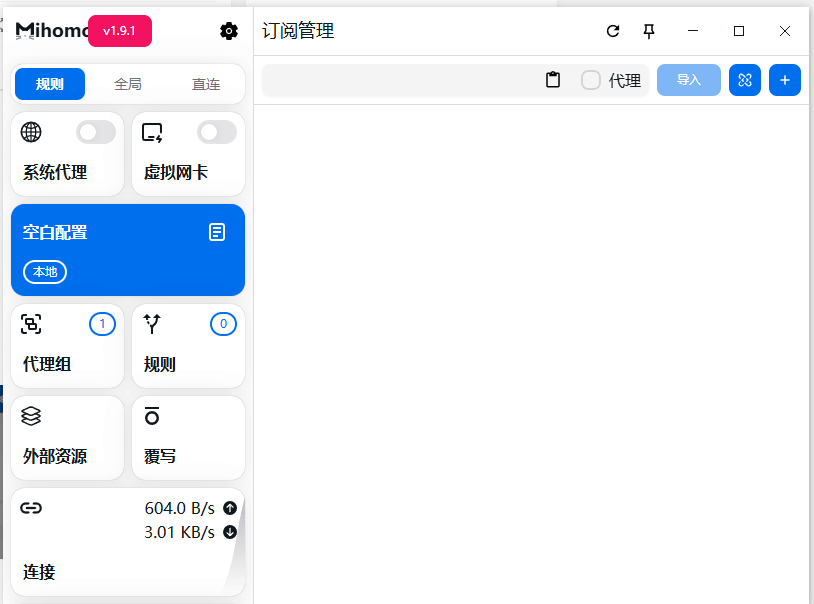
第一步安装客户端
| ➡ Clash for windows下载(64位) ](下载完毕双击下载的压缩包。) (解压前请退出360安全中心会拦截Clash网络核心文件)
![图片[1]-Windows PC电脑-Clash教程-E百分网络](https://storage.crisp.chat/users/helpdesk/website/ca2b5e3b64578800/image_124f58c.png)
![图片[2]-Windows PC电脑-Clash教程-E百分网络](https://storage.crisp.chat/users/helpdesk/website/ca2b5e3b64578800/image_15jjkhn.png)
![图片[3]-Windows PC电脑-Clash教程-E百分网络](https://storage.crisp.chat/users/helpdesk/website/ca2b5e3b64578800/image_1xsqyz1.png)
![图片[4]-Windows PC电脑-Clash教程-E百分网络](https://storage.crisp.chat/users/helpdesk/website/ca2b5e3b64578800/image_tugeq.png)
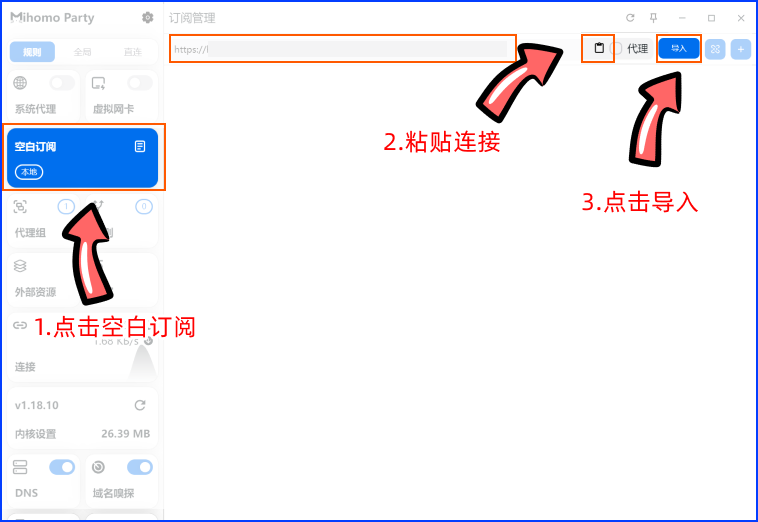
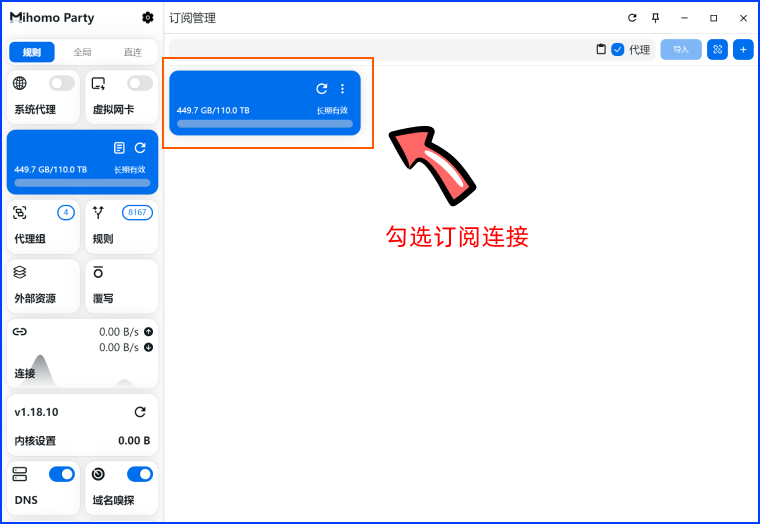
第二步导入官网节点订阅链接
![图片[5]-Windows PC电脑-Clash教程-E百分网络](https://storage.crisp.chat/users/helpdesk/website/ca2b5e3b64578800/image_1iwao8h.png)

![图片[7]-Windows PC电脑-Clash教程-E百分网络](https://storage.crisp.chat/users/helpdesk/website/ca2b5e3b64578800/image_zx4u1j.png)
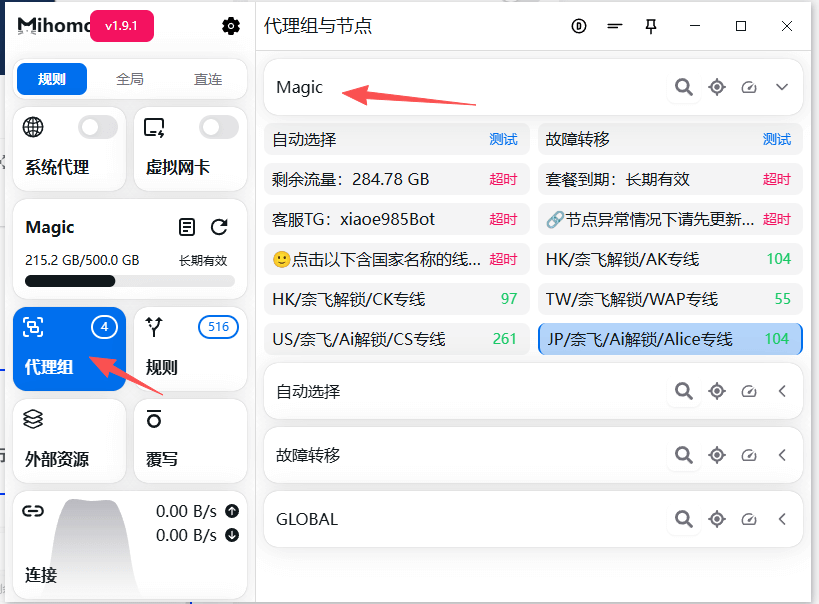
第三步 切换自己想用的节点
![图片[8]-Windows PC电脑-Clash教程-E百分网络](https://storage.crisp.chat/users/helpdesk/website/ca2b5e3b64578800/image_1csist9.png)
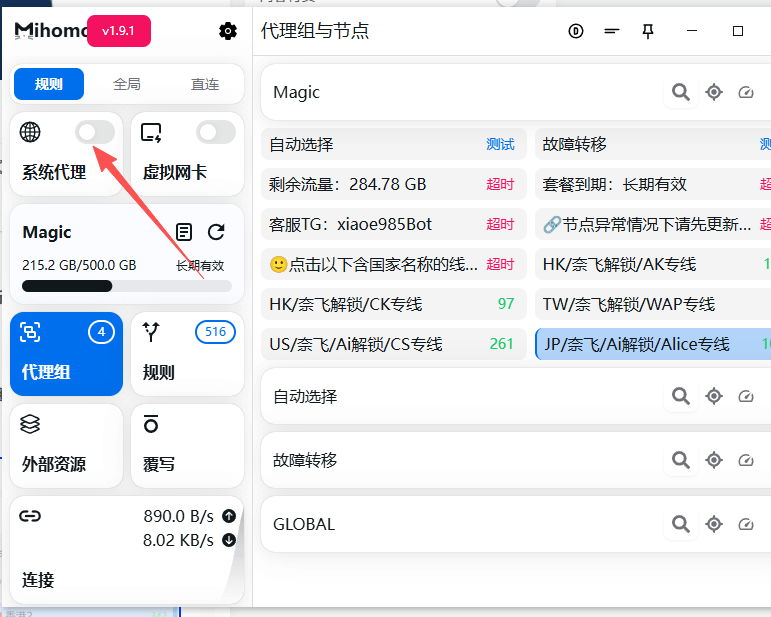
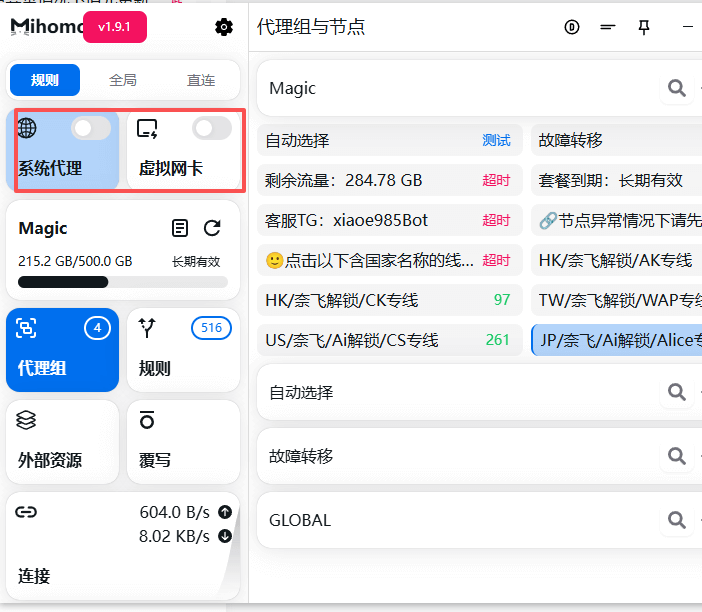
第四步 开启代理软件代理开关
到这里网络代理就已经开启了。
© 版权声明
文章版权归作者所有,未经允许请勿转载。
THE END


| ➡ Clash for windows下载(64位) ](下载完毕双击下载的压缩包。) (解压前请退出360安全中心会拦截Clash网络核心文件)
![图片[1]-Windows PC电脑-Clash教程-E百分网络](https://storage.crisp.chat/users/helpdesk/website/ca2b5e3b64578800/image_124f58c.png)
![图片[2]-Windows PC电脑-Clash教程-E百分网络](https://storage.crisp.chat/users/helpdesk/website/ca2b5e3b64578800/image_15jjkhn.png)
![图片[3]-Windows PC电脑-Clash教程-E百分网络](https://storage.crisp.chat/users/helpdesk/website/ca2b5e3b64578800/image_1xsqyz1.png)
![图片[4]-Windows PC电脑-Clash教程-E百分网络](https://storage.crisp.chat/users/helpdesk/website/ca2b5e3b64578800/image_tugeq.png)
![图片[5]-Windows PC电脑-Clash教程-E百分网络](https://storage.crisp.chat/users/helpdesk/website/ca2b5e3b64578800/image_1iwao8h.png)

![图片[7]-Windows PC电脑-Clash教程-E百分网络](https://storage.crisp.chat/users/helpdesk/website/ca2b5e3b64578800/image_zx4u1j.png)
![图片[8]-Windows PC电脑-Clash教程-E百分网络](https://storage.crisp.chat/users/helpdesk/website/ca2b5e3b64578800/image_1csist9.png)
到这里网络代理就已经开启了。
暂无评论内容